
LaTeXiT is a small macOS application that I find very convenient when I want to typeset a single equation and paste it into slides, notes, or figures.
The annoying part is that LaTeXiT expects ordinary LaTeX-related commands such as pdflatex, ps2pdf, and gs to be available on the host machine.
I wanted to keep my host environment light and use the same LaTeX environment that I already manage through Docker. This note describes the small wrapper-script setup I used to make LaTeXiT call LaTeX tools inside a Docker container.
Goal#
The goal is simple:
- keep the TeX Live environment inside Docker,
- let LaTeXiT behave as if
pdflatex,ps2pdf, andgswere installed locally, - avoid root-owned output files,
- make temporary files created by LaTeXiT visible from inside the container.
The key idea is to place wrapper scripts somewhere in my PATH, and then point LaTeXiT’s program paths to those scripts.
Wrapper scripts#
I created three scripts under my local bin directory:
~/bin/pdflatex_docker.sh
~/bin/gs_docker.sh
~/bin/ps2pdf_docker.sh
Each script runs the corresponding command inside the same Docker image.
In my setup, I adopted the image of lualatex-template-tex-ubuntu:latest.
The pdflatex wrapper looks like this:
#!/bin/bash
CWD=$(pwd)

CACHE_DIR="/tmp/texmf-cache"
mkdir -p "$CACHE_DIR"

docker run --rm \
  --user $(id -u):$(id -g) \
  -e TEXMFVAR="$CACHE_DIR" \
  -v /tmp:/tmp \
  -v /var/folders:/var/folders \
  -v "$CWD":"$CWD" \
  -w "$CWD" \
  lualatex-template-tex-ubuntu:latest \
  pdflatex "$@"
The Ghostscript wrapper is almost the same:
#!/bin/bash
CWD=$(pwd)

docker run --rm \
  --user $(id -u):$(id -g) \
  -v /tmp:/tmp \
  -v /var/folders:/var/folders \
  -v "$CWD":"$CWD" \
  -w "$CWD" \
  lualatex-template-tex-ubuntu:latest \
  gs "$@"
And the ps2pdf wrapper is:
#!/bin/bash
CWD=$(pwd)

docker run --rm \
  --user $(id -u):$(id -g) \
  -v /tmp:/tmp \
  -v /var/folders:/var/folders \
  -v "$CWD":"$CWD" \
  -w "$CWD" \
  lualatex-template-tex-ubuntu:latest \
  ps2pdf "$@"
After creating these files, I made them executable and ensured that ~/bin was included in my shell PATH.
chmod +x ~/bin/pdflatex_docker.sh
chmod +x ~/bin/gs_docker.sh
chmod +x ~/bin/ps2pdf_docker.sh
For my shell environment, this means having something like the following in the shell configuration:
export PATH="$HOME/bin:$PATH"Even so, I used absolute paths when configuring LaTeXiT itself,
because GUI applications do not always inherit the same PATH as an interactive shell.
Why these options matter#
There are a few details that turned out to be important.
First, --user $(id -u):$(id -g) prevents Docker from creating root-owned output files.
Without this, generated files can become annoying to clean up or overwrite from macOS.
Second, the current working directory is mounted into the container:
-v "$CWD":"$CWD"
-w "$CWD"
This makes relative paths behave naturally. LaTeXiT can create files in its temporary working directory, and the command inside Docker sees the same directory as its working directory.
Third, I mounted both /tmp and /var/folders:
-v /tmp:/tmp
-v /var/folders:/var/folders
On macOS, GUI applications often use temporary directories under /var/folders. If LaTeXiT asks pdflatex to compile a file in such a directory, the Docker container also needs to see it.
Mounting /var/folders was the small but essential macOS-specific part of the setup.
Finally, pdflatex_docker.sh sets TEXMFVAR to a writable cache directory under /tmp. This avoids cache-related permission issues inside the container.
LaTeXiT configuration#
In LaTeXiT, I opened the preferences and replaced the command paths with the wrapper scripts:
pdflatex  -> /Users/ikarishota/bin/pdflatex_docker.sh
ps2pdf    -> /Users/ikarishota/bin/ps2pdf_docker.sh
gs        -> /Users/ikarishota/bin/gs_docker.sh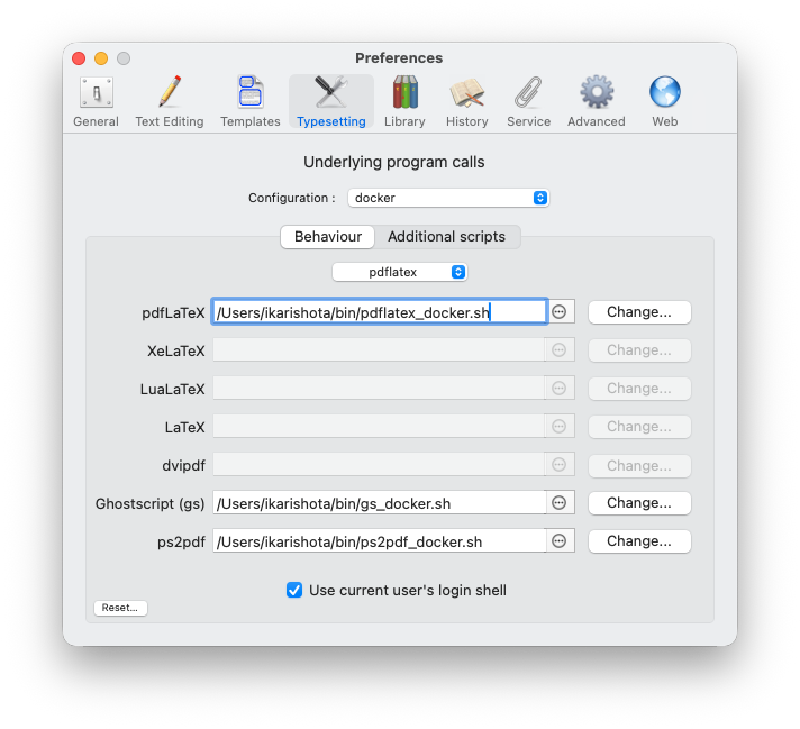
The exact UI labels depend on the LaTeXiT version, but the important point is that LaTeXiT should call the wrapper scripts instead of host-installed binaries.
I also enabled “Use current user’s login shell” in LaTeXiT. In this setup, the program paths are absolute, so this is not the only thing making the wrappers discoverable, but it is still useful when the commands depend on shell-side environment variables.
Once this is configured, LaTeXiT still feels like a native macOS app. The only difference is that the actual LaTeX toolchain runs inside Docker.
Result#
As a quick check, I typeset a standard equation in LaTeXiT. From the application side, nothing special is visible: I write LaTeX source, press the typesetting button, and get the rendered equation back.
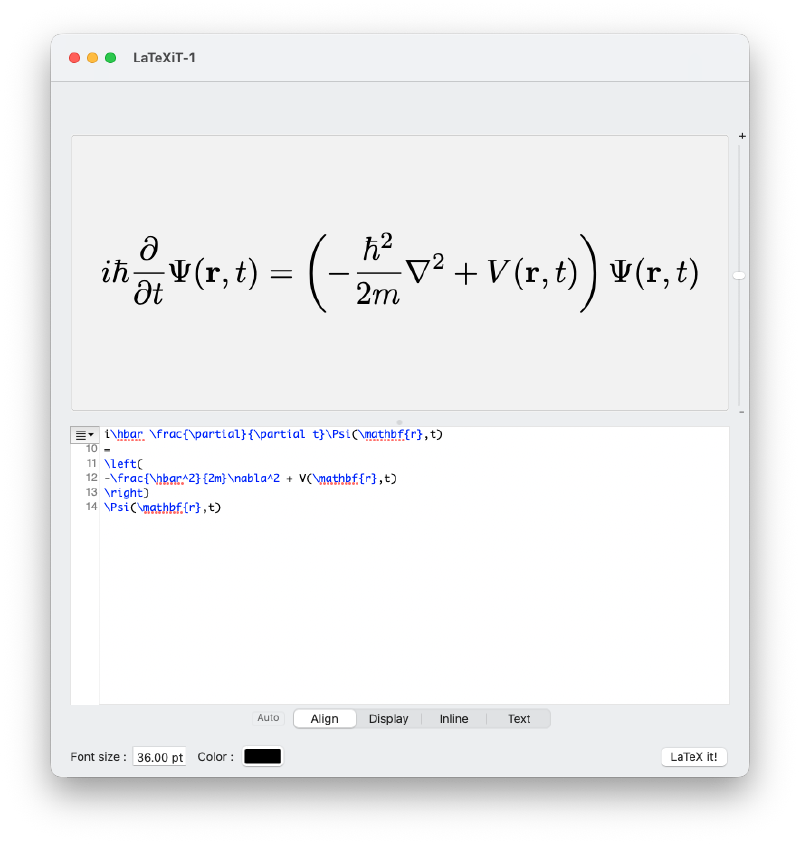
This was the main thing I wanted from the setup. The Docker layer stays hidden behind the wrapper scripts, while LaTeXiT remains convenient for quick equation snippets.
A small trade-off#
This setup is not the fastest possible one, because each LaTeXiT compilation starts a short-lived Docker container. For my use case, that overhead is acceptable: I usually typeset small equations, and I prefer reproducibility and a clean host environment over shaving off a little startup time.
If the startup cost becomes irritating, a natural next step would be to keep a long-running container alive and execute commands inside it. For now, the stateless docker run --rm approach is simple enough that I like it.
Conclusion#
The useful pattern here is not specific to LaTeXiT. When a macOS application expects a command-line tool, a thin wrapper script can often bridge it to a Dockerized environment. In this case, three wrapper scripts were enough to make LaTeXiT use a Docker-managed LaTeX installation while keeping the host machine relatively clean.
If you also want to keep your local LaTeX installation minimal, this setup may be worth trying.